


For the quarter ending December 31, 2025, here are some product release highlights.
We shipped over 30 changes in Q4, ranging from brand-new features to critical improvements to bug fixes.
New Features
MCP Tools for Mobile
In some big news, MCP Tools is now available for Mobile. Integrating with AI coding tools like Cursor, MCP Tools for Mobile gives developers working inside agentic IDEs some incredibly powerful options. First, the Integrated Development Environment (“IDE”) can communicate with Evinced and automatically scan a given iOS or Android screen for accessibility problems, then programmatically receive a punch list of issues to fix and advice on how to fix them. Then, as with our web version, the IDE can iterate with Evinced programmatically until all of the issues are resolved and the code is commit-ready. We view this as an essential part of any agentic coding workflow, because integrating Evinced serves as a check on the LLMs in case they think code is accessible but it isn’t. (Which happens all too often.) We are excited about MCP Tools because they are really the last mile when it comes to accessibility.
Beyond extending MCP Tools to mobile, we also made some improvements this quarter for MCP Tools for Web:
- Support for analysis and remediation of web pages behind login or at a given page state
- The ability to scan and remediate a certain portion of a given web page
- Improved remediation instructions for some types of critical issues
- Issue summaries and severities are displayed in the context window to reduce clutter, and users can click on an issue to see the details (now stored in the MCP server memory)
- Optimizations for handling large reports
- Better iFrame support
Introducing the Web Dashboard
Released at the end of December, the Web Dashboard is a platform feature that provides a unified view of accessibility information coming from Web Flow Analyzer and Automation SDKs for Web.
The way that customers control which data is presented in the dashboard is by the use of labels. Out of the box, Evinced provides two “core” labels: Business Unit (for example, “Wealth Management”) and Environment (for example, “Production” or “QA”). When running accessibility sessions with Web Flow Analyzer or the Automation SDK for Web, customers tag their data with the configured label values. Only data tagged with these required labels is aggregated into the Web Dashboard. The labels can also be easily added in the platform retrospectively, after the data was uploaded.
The technical achievement that bears mentioning here is the de-duplification. Web Dashboard de-duplicates issues across session and data source to give you the most accurate view available in the industry today. For example, if you have a team using Web Flow Analyzer that monitors your login flow and automated test scripts that include login, any accessibility problems with your login flow will only be reported once in your Web Dashboard.
Users can view snapshots, trends, and data by business unit that they have labeled, and can bulk-manage labels from any data source.
Web Dashboard is available to select customers upon request and configuration by Evinced.
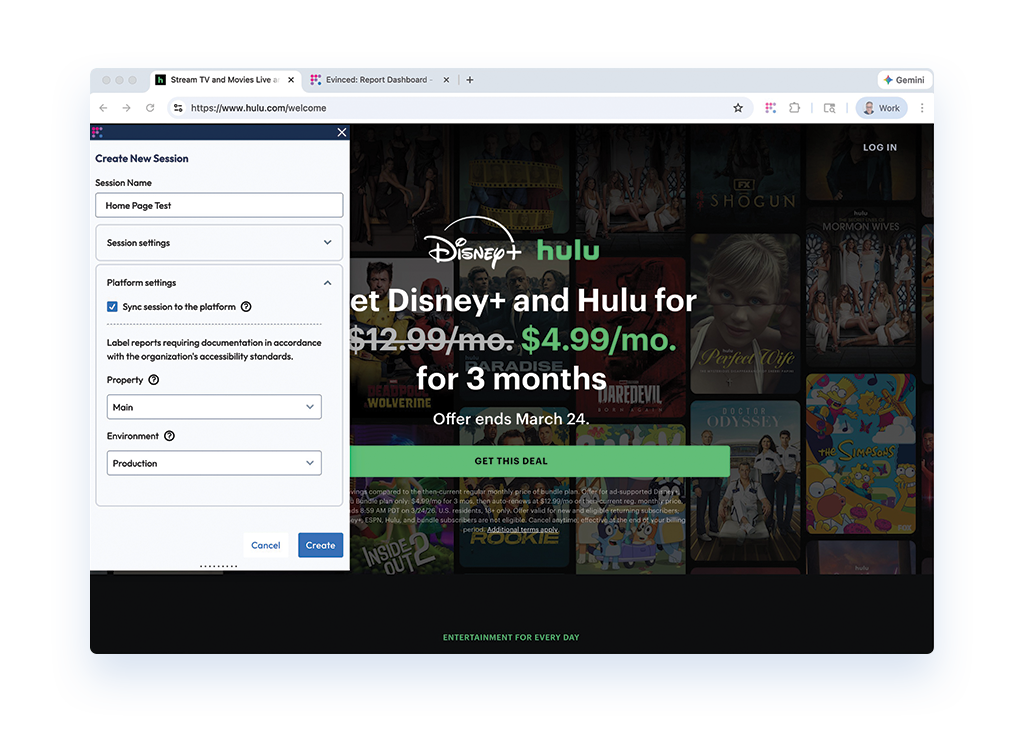
Image: session configuration with platform integration in Web Flow Analyzer
Improvements
Flutter support for mobile accessibility testing
As of December 2025, Evinced supports Flutter across both Mobile Flow Analyzer (MFA) and Automation SDK for Mobile. Flutter is Google’s open-source UI software development kit (SDK) used by developers to build natively compiled, multi-platform applications from a single codebase.
With this release, teams building Flutter apps can run Evinced’s accessibility testing directly on their mobile applications. Flutter support currently includes 22 of 33 validations on Android and 16 of 21 validations on iOS, delivering meaningful coverage out of the gate with more on the way.
This milestone builds on our expanding support for modern cross-platform frameworks. After introducing React Native support in Q3 2025, adding Flutter in Q4 continues our mission to revolutionize mobile accessibility coverage.
App scanning in Automation SDK Mobile for Appium
App scanning for Android application development has been available in Mobile Flow Analyzer since Q2, and continues to be the most unique feature in the mobile accessibility space.
Now, due to customer demand, app scanning is available for Automation SDK for Mobile via Appium, bringing this groundbreaking functionality to iOS as well as Android applications.
The app scanning feature will automatically crawl through mobile applications to identify accessibility issues at scale, generating detailed reports and app navigation maps (like the one below), all triggered by invocation from the SDK.
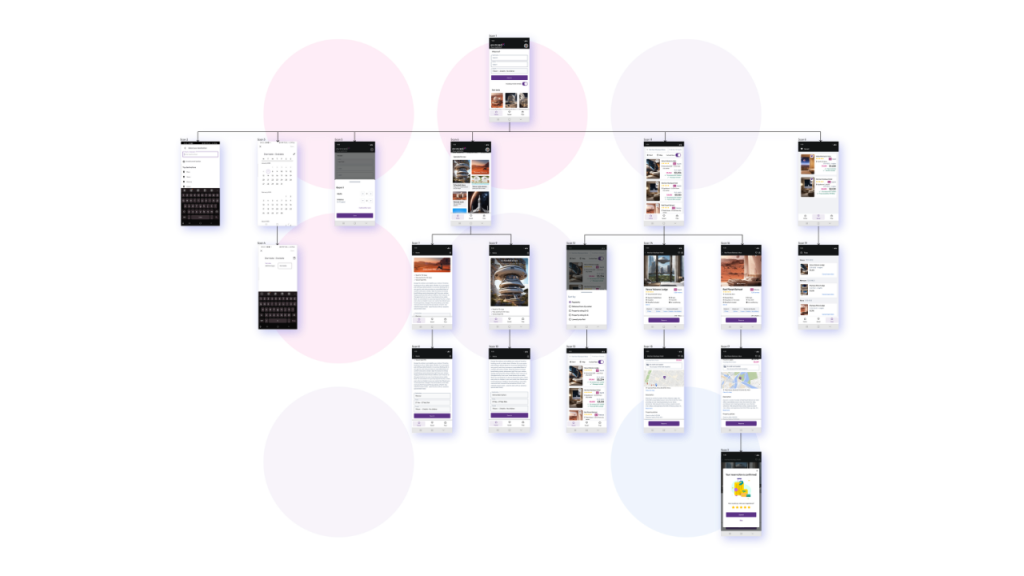
Image: app navigation map in Mobile Flow Analyzer
New Validations for Automation SDK for Mobile
In Q4, we released two new validations for mobile: non-interactive-in-focus-sequence and on-focus, both for Android.
Non-interactive-in-focus-sequence prevents keyboard focus on non-interactive elements. This validation streamlines keyboard navigation, preventing screen reader users from getting stuck on dead-end elements.
On-focus ensures interactive elements receive keyboard focus. This new validation guarantees all actionable items are discoverable for keyboard and screen reader users.
Stay organized with multiple collections in Site Scanner
Now teams can create and manage multiple collections of scans in Site Scanner. Additionally, admin users can set collections as private (visible only to one user) or public (shared across the organization, managed by admins). Teams can also filter scans by collection to quickly narrow the view and reduce noise.
In brief
A “dual login” system for Mobile Flow Analyzer resolves a critical user lockout issue by re-enabling the reliable legacy authentication method. Mobile Flow Analyzer is now available on macOS Tahoe 26. New for Automation SDK for Web, support for component testing in Cypress JS and Playwright JS has been added and is configurable by the Evinced team. Automation SDK for Web (Playwright JS and Playwright Java) can now be configured to show a list of validations that were successfully passed in addition to the usual list of failures. Design Assistant supports easier element identification in headings and alternative text.
For the full list of improvements and feature updates, please see our What’s New product update page (requires login).


