

At Evinced, we post a lot of video, and we are accustomed to doing all we can to make those videos accessible. We take great care with editing captions, for example, and we also try to have audio described (“AD”) versions so that blind and low-vision users can get as much as possible out of them.
But that’s where we have run into a problem, and you might well have, too. Below, we’ll describe the problem, and how we addressed it, which we think is actually maybe new in the world. Hopefully this could help your team as it manages videos.
The problem
It turns out that YouTube and Vimeo, the standard video hosting services that we otherwise love, make it really hard to discover audio description versions of videos.
Imagine that you are a blind or low vision user and you have been emailed a link to a video. Once you arrive at the video, how would you know there is an AD version? How would you get to it, if there is one?
Our first thought: in the video description box
The first thing that we tried was to put a link to the audio description version of the video inside the description box of the video, like so:
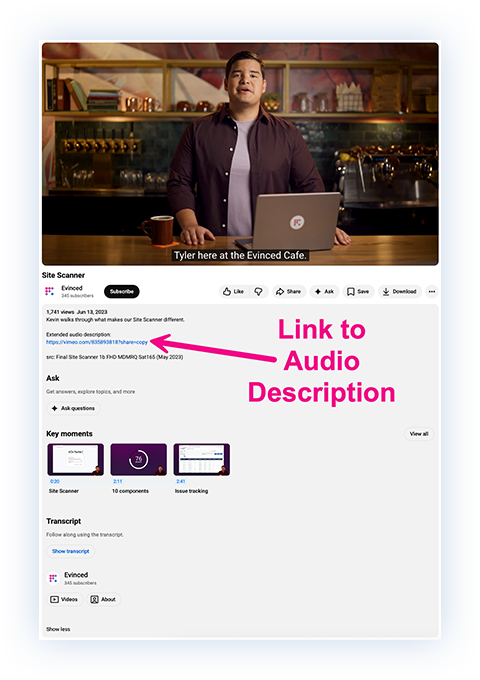
This seems like a straightforward solution, but it doesn’t work for everyone.
For starters, screen reader users can’t find that description box easily. Even tabbing through (clicking “tab” instead of using a mouse to navigate a site) is a really cumbersome experience.
We tried it, and had to click the tab button on 21 elements on the page before getting to the description box. Two more clicks and we could open the AD link.
It was clunky and inefficient at best.
Our second thought: playlists, and two links
Since the idea of navigating from an existing video to an audio-described version of that same video is basically inaccessible, we thought a little further.
What if we put all the audio description versions in a playlist? That way, when somebody is communicating the existence of a video or video series, they could include a link to the AD version(s).
This requires some more work for the team uploading the videos, but it is an accessibility improvement. Though, if handled properly, the extra text takes up quite a lot of space, as in:
Watch this new accessibility series with Josh Blue (audio description here).
Shameless plug aside, that usage of space becomes important when writing posts or captions with character limits. And, screen reader users will still need to get past the first link (without clicking on it) to know that the second version exists. It’s still not ideal.
Our solution
Due in no small part to these accessibility problems, we’ve started hosting more video on our Evinced Videos page.
So far, our solution is to group videos into a series playlist, and then at the top of each series playlist, allow the user to toggle between the standard version and the AD version of that series.
It looks something like this:
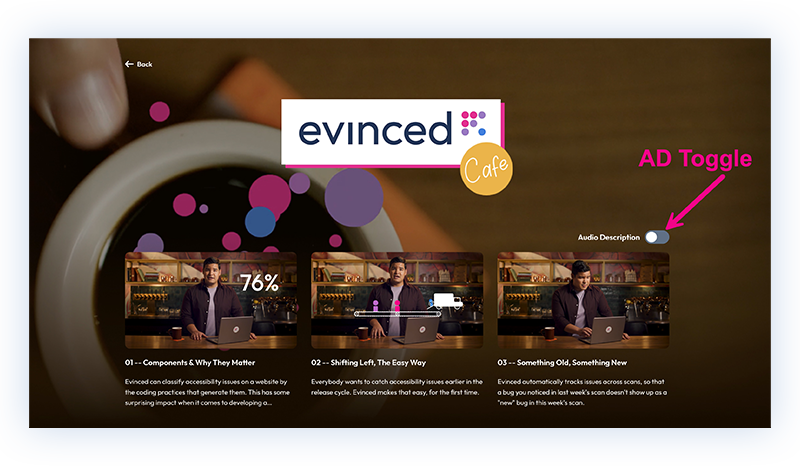
Image: audio description toggle set to off; standard versions of videos populate the page
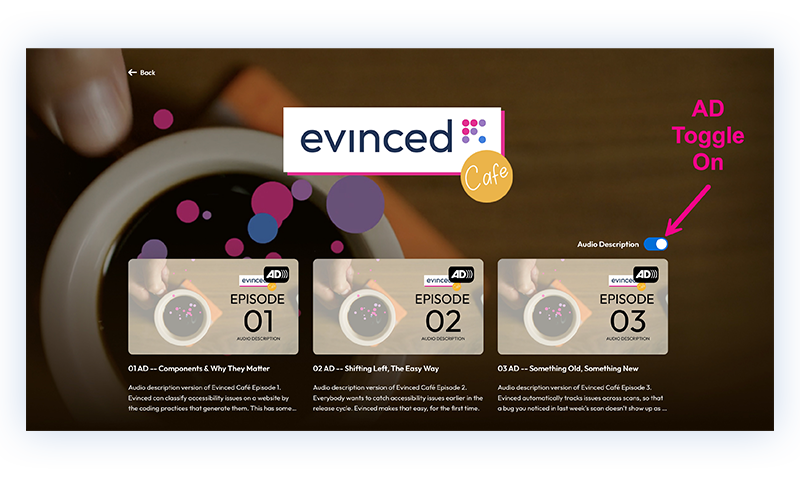
Image: audio description toggle set to on; AD versions of videos populate the page
For a company making different video series, this works well. The videos are logically grouped together, and the viewer can toggle between the version of the videos that works best for them.
It’s less efficient for standalone videos. But it has the advantage of being clearly identifiable by screen readers, and only requiring interaction once. That kind of efficiency is a key concern for screen reader users, since working through a page word-for-word just to get to where you need to go is potentially exhausting.
Screen reader users have developed a large set of techniques to work through this problem, but they only work if the page cooperates.
And we like cooperating.
What needs to happen
Given that the EAA is requiring audio description versions from here on out, we would have hoped that major video players would have evolved handling for audio description versions that is akin to what happens for captions now.
You would simply open the player, tab to a control in a known location for checking for the presence of an audio description version, and then invoke it with the keyboard.
Those video players have a lot of things on their video plates, but we do think they will have to move in this direction sooner or later. And when they do, we will be happy to retire our little toggle switch. But in the meantime, toggle away.


